Soft-delete for Conditional Access

Until now, once you deleted a Conditional Access policy it was gone forever. You always had the option to disable it or set it to report-only mode but as with so many other things, old policies have a tendency to be kept "just in case" and be forgotten.
Having the option to restore a deleted policy will make it easier to removing them, and offers a quick way to get it back in case of a mistake.
In general, I recommend that you have your policies well documented, or even implemented with CI/CD. In this case, the feature does not offer to much as you already know how to re-implement the policy.
Supported environments
| Global service | US Government L4 | US Government L5 (DOD) | China operated by 21Vianet |
|---|---|---|---|
| ✅ | ❌ | ❌ | ❌ |
Using the Entra portal
Sign-in to the Entra portal and navigate to Conditional Access. You should now see a new menu option, Deleted Policies (Preview).
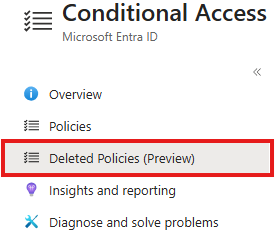
Any policy deleted within 30 days will show up an can be restored. After 30 days, the policy is hard-deleted and will not be available.
Using Graph
Query deleted policies in the recycle bin
# Connect to Graph with read access to policies
Connect-MgGraph -Scope Policy.Read.All

$uri = "/beta/identity/conditionalAccess/deletedItems/policies"
Invoke-MgGraphRequest -Uri $uri -OutputType PSObject | Select -Expand Value
Restore a deleted policy from the recycle bin
# Connect to Graph with read/write access to policies
Connect-MgGraph -Scope Policy.ReadWrite.All

$policyId = "<policy id>"
$uri = "beta/identity/conditionalAccess/deletedItems/policies/$policyId/restore"
Invoke-MgGraphRequest -Uri $uri -Method Post
There is no console output when succesful. You can verify the result by querying for it
$uri = "identity/conditionalAccess/policies/$policyId/"
Invoke-MgGraphRequest -Uri $uri $OutputType PSObject | Select -Expand Value
or by going to the Entra portal.
Comments
Leave a Comment
Reply to Comment
No comments yet. Be the first to share your thoughts!